


As you consider transitioning to Nextway.cloud, it’s essential to know which version of Next you are currently running. This information gives you insight into where you stand compared to the SaaS (Sofwtare-as-a-Service) version and ensures a smooth migration process. Here’s a quick guide on how to find your version:
Identifying Your Version of Next: 1.0 or 2.0
Users of Next may see different interfaces, depending on whether they are using Next 1.0 or Next 2.0. Here’s how to quickly identify which version you’re on and find the version number:
For Next 2.0 users:
1. Open your Next in the browser
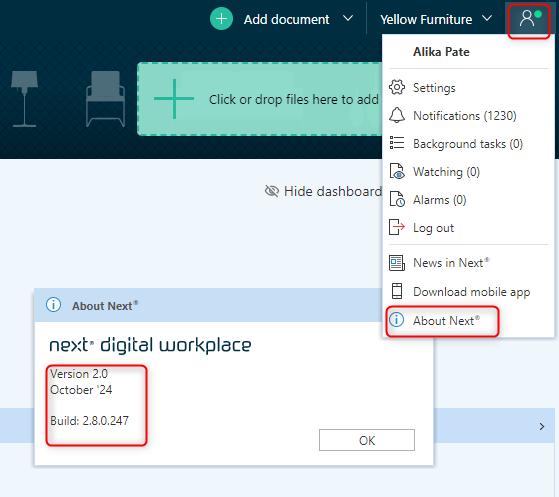
2. Click on the person icon in the upper right corner and select "About Next.
3. Locate version information:
- This section will provide details about your version number, the current release you’re running (e.g., October '24 release or June '23), and the build number.
- For example, at the time this guide was made, Nextway.cloud was running the October 2024 release on Build 2.8.0.247.
4. Compare your version:
Head to the News in Next page, and click the latest release, eg: October '24 - scroll to the bottom of the page, and see the version history. Compare this with your own build to assess whether you’re up to date.
For Next 1.0 Users:
If you do not see the person icon in the upper right corner, you’re likely using Next 1.0. Here’s how to confirm:
Check the logo in the upper left corner:
- If the logo says "Next" with a yellow shield icon next to it, you're on Next 1.0. Clicking this logo will bring up a pop-up window providing details about the risks of running Next 1.0 and guidance on what steps to take next.

- If the logo says "Multi Support Next," you're also running Next 1.0 and the same risks and guidance apply to you.

These are clear indicators that you are still on an older version, and upgrading should be a priority to benefit from enhanced features and improved security in Next 2.0.
Why It Matters
Understanding the difference between your on-premises version of Next and the cloud-based Nextway.cloud version is essential for your IT team and consultants as you plan for the future. Knowing where your version stands helps estimate the scope of your transition. But it also gives you a clear indication that your system needs an upgrade.